Software Defined Networking
Today, I want to share my understanding of Software-Defined Networking (SDN) and how modern networking has moved beyond traditional infrastructure challenges.
The Traditional Networking Approach
Earlier, enterprise networks were built using physical networking devices:
-
Switches
-
Routers
Hardware appliances such as firewalls, load balancers, and intrusion prevention systems
These devices acted like toll gates, processing each packet traveling from Computer A to Computer B. Every function — routing, filtering, monitoring, prioritization — was tightly coupled with the hardware.
However, this approach introduced several limitations:
-
Vendor lock-in : Network devices used proprietary software and protocols; switching vendor ecosystems was expensive and complex.
-
Manual configuration overhead : Every router, switch, and firewall needed individual rule updates.
-
Scalability challenges : Growing network demands required more hardware and administrators.
-
Slow change management : Policy updates could take days or weeks to roll out across an entire network.
Organizations needed a way to centralize control and accelerate network agility.
How SDN Solves These Problems
Software-Defined Networking introduced a layered architecture and separated the control of the network from the data forwarding.
SDN Architecture
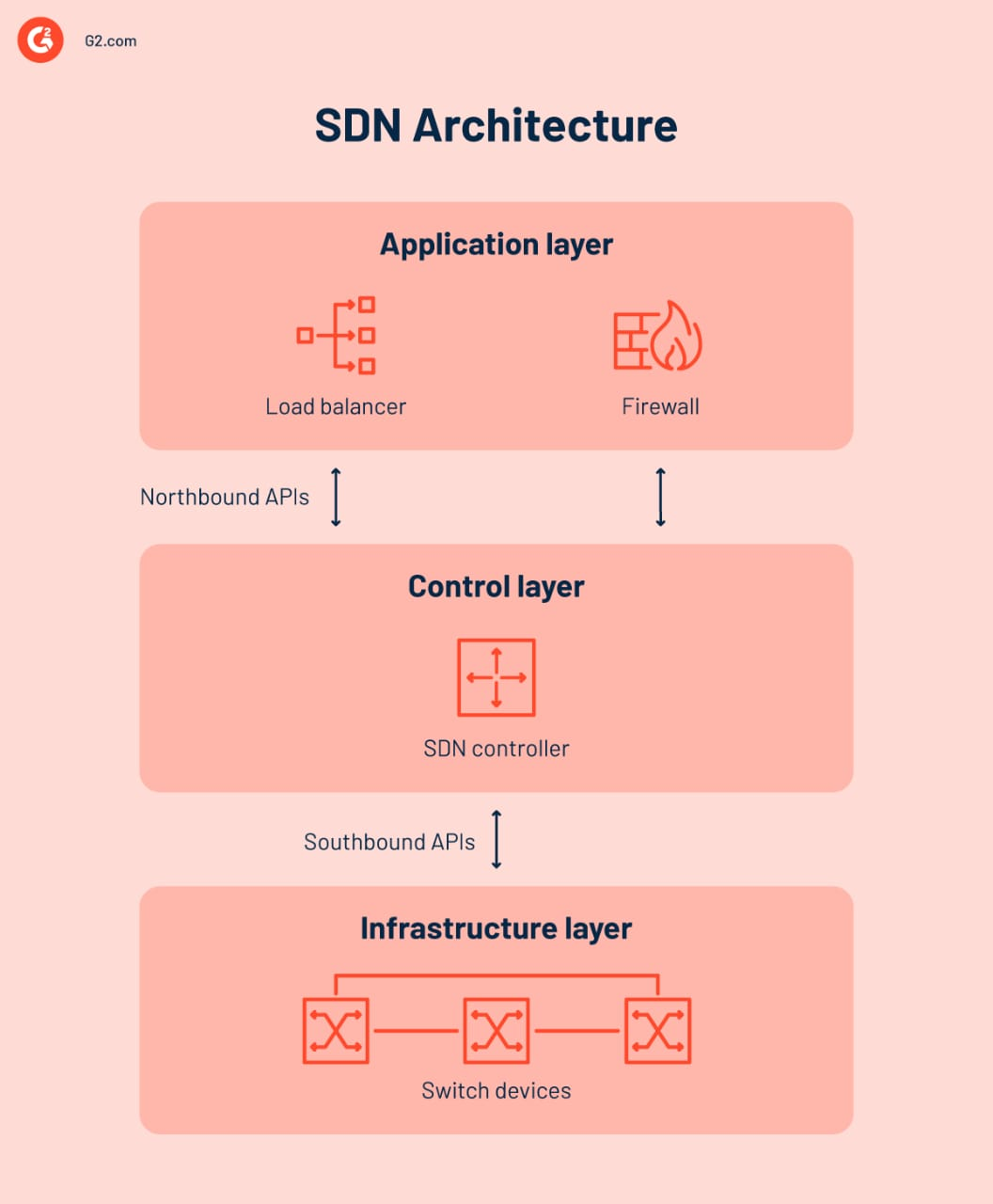
- Application Layer Defines network policies and business requirements
- Control Plane SDN controller decides rules, manages routing, and maintains global network view
- Data Plane Physical/virtual switches that forward packets based on the rules
Northbound & Southbound APIs
To enable communication across layers & reduce human errors:
-
Northbound APIs : Between Application Layer & Controller. Used for policy input.
-
Southbound APIs : Between Controller & Network Devices. Used to push forwarding rules (e.g., OpenFlow).
How Packet Forwarding Works
SDN switches contain flow tables. When a packet arrives:
-
The switch extracts the packet header.
-
It searches for a matching flow entry.
-
If a match exists → executes the specified action (forward/drop/modify) & update the counter.
-
If no match is found → sends the packet to the controller for instructions.
-
Controller installs a new flow rule and updates counters.
This automation minimizes manual configuration and reduces human error.
Flow table & flow entries
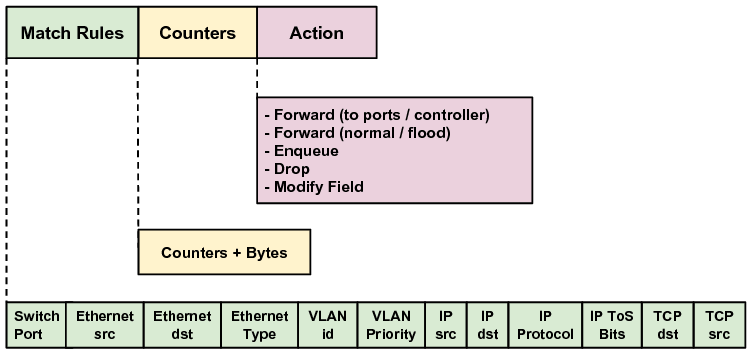
In an OpenFlow-enabled switch, packet forwarding is determined by Flow Tables. Each table contains multiple Flow Entries, which define how incoming packets should be processed. Switches may contain a pipeline of several flow tables, enabling flexible and programmable packet treatment.
Flow Table Components A flow table consists of the following elements:
| Component | Description |
|---|---|
| Match Fields | Header fields used to classify packets and compare against flow entries |
| Counters | Track statistics of matched packets (e.g., packets processed, bytes transferred, duration) |
| Instructions / Actions | Define what to do when a match is found |
Flow Entries Each entry in a flow table describes a forwarding rule applied to packets. A Flow Entry contains:
| Element | Description |
|---|---|
| Match Fields | Criteria to match packet headers |
| Priority | Determines rule selection when multiple entries match |
| Counters | Incremented on each match |
| Instructions / Actions | Specifies forwarding, dropping, modifying, or pipeline navigation |
| Timeouts | Idle-timeout or hard-timeout for rule expiration |
| Cookie | Application-specific identifier for tracking and debugging |
Match Fields Match fields define which packet characteristics are used for comparison when searching for a matching rule.
Examples of commonly used match fields:
- Ethernet source/destination MAC address
- VLAN ID / Ethernet Type
- IP source/destination address
- IP protocol (TCP/UDP/ICMP)
- TCP/UDP source & destination ports
- MPLS label
- Ingress port
Example: Match: (src_ip=10.1.1.5, dst_port=443, protocol=TCP)
Counters Counters gather statistics about matched packets and are useful for monitoring, load-balancing, and analytics.
| Counter | Meaning |
|---|---|
| Packet Count | Number of packets matching the rule |
| Byte Count | Total size of packets |
| Duration | Lifetime of the rule |
Actions & Instructions
Actions specify what happens to packets that match flow entries. They can be required or optional depending on OpenFlow version.
Required Actions
| Action | Description |
|---|---|
| Output | Send packet to a specified port (physical, logical, or controller port) |
| Drop | Discard the packet by specifying no action |
Optional Actions
| Action | Description |
|---|---|
| Set-Field | Modify packet header fields (MAC, IP, VLAN, etc.) |
| Push/Pop VLAN/MPLS Tag | Add or remove encapsulation tags |
| Group | Use group tables for load balancing, multipath forwarding, broadcast/multicast |
| Queue | Assign packets to a QoS queue |
| Goto-Table | Continue processing in the next flow table |
OpenFlow Messaging
OpenFlow defines message types used for communication between the SDN Controller and OpenFlow-enabled switches. These messages exchange state, topology, flow rules, and packet-handling decisions.
Types of OpenFlow Messages
| Category | Description | Initiated By |
|---|---|---|
| Controller-to-Switch Messages | Used to configure switch behavior (manage flow tables, request stats, send rules) | Controller |
| Symmetric Messages | Exchanged by both controller & switch without prior request (e.g., Hello message) | Both |
| Asynchronous Messages | Notify the controller about network events, state changes, packet arrivals, and errors | Switch |
Controller–Switch Interaction Workflow
Typical interaction flow between an SDN Controller and OpenFlow switch:
1. Connection Setup
- The switch sends a Hello message to the controller when powered on or newly added to the network.
- The controller responds with its Hello message to establish the OpenFlow session.
2. Topology Discovery
- The controller uses protocols like LLDP to learn the full topology.
- When a packet arrives without a matching flow entry, the switch sends a Packet-In message to the controller.
3. Controller Decision Processing After receiving a Packet-In, the controller:
- Runs routing/security/policy logic
- Decides the appropriate action
- Sends a Flow-Mod (flow modification) message to install new forwarding rules on the switch
- For the pending packet, sends a Packet-Out message instructing where to forward it
Future packets Any similar packets now match the installed rule, so the switch handles them locally without contacting the controller.
OpenFlow Pipeline : How a Switch Processes Packets
When a packet enters an OpenFlow switch:
- Flow Table Lookup
- Extract packet header fields
- Search flow tables (priority-based lookup)
- Match Found
- Execute associated action (forward, drop, modify, send to port, group)
- Update counters (used for stats & monitoring)
- No Match
- Apply default instruction : send Packet-In to controller
- Wait for controller guidance (Flow-Mod + Packet-Out)
NFV: Network Function Virtualization
SDN enables centralized control, but we still need firewall, NAT, DPI, WAN optimization, etc. Instead of deploying physical boxes, NFV provides software-based implementations of these services.
Components of NFV:
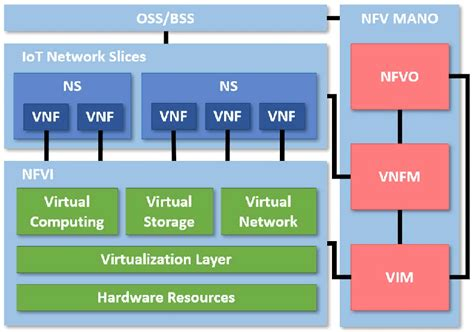
- VNF (Virtual Network Functions) Software versions of network functions (firewall, IDS, LB, etc.)
- NFVI Virtualization infrastructure (compute, storage, networking) need by VNF to run
- OSS/BSS Business and operations support systems got NFV
- MANO (Management and orchestration of VNFs)
- VIM : Control & manages NFVI resources
- VNFM : Manages VNF lifecycle
- NFVO : Orchestrator that …
This reduces cost and enables flexible deployment similar to cloud computing.
Note: The SDN apps is not the same as NFV apps like firewall, load balancer, etc.
Network Slicing: Use Case in 5G
Network slicing creates multiple dedicated virtual networks on shared physical infrastructure. Different industries have different requirements:
- Autonomous vehicles : ultra-low latency
- Video streaming : high bandwidth
- IoT sensors : massive device connectivity
Without slicing, ISPs would need separate hardware per use case, extremely expensive. With slicing, each service gets its own optimized virtual network.
Conclusion
SDN modernizes networking by:
-
Centralizing control
-
Enabling automation
-
Increasing scalability and flexibility
-
Reducing operational cost
-
Supporting advanced capabilities like NFV and Network Slicing
It transforms networks from rigid hardware systems into programmable, dynamic environments